Table of Contents
Short Checklist
| Problem | What to check first |
|---|---|
| The build works but the module does not start the application | Is a Signing Key set? Does the build log show Status : Signed? |
The package shows Unsigned |
Was it signed at all? Maybe the signing failed, check the status log. |
The package shows Signed with different key |
Which key is selected in the left panel? Compare the fingerprints. |
Authenticate stays grey |
Is a module selected? Does the module have cybersecurity? Is a CAN channel selected? |
| The authentication worked but the buttons are blocked again | The timeout of the module is over, or the module had a power cycle, or you scanned again. Authenticate again. The countdown can still show time left, it is only an assumption. |
| Nothing works after the project was moved | The key paths point to files that are not on this PC. Select both keys again. |
Errors while Signing
| Message | Reason | What to do |
|---|---|---|
| Firmware Signing: no key configured | No Signing Key in the project. |
Set the signing key on the Project page and build again. |
| Firmware Signing: key file not found | The saved path does not exist any more, e.g. project moved or other PC. | Select the key file again. |
| Signing key file does not exist. Please select a valid PEM/private key file. | Same as above, but on the signing page. | Select the key file again. |
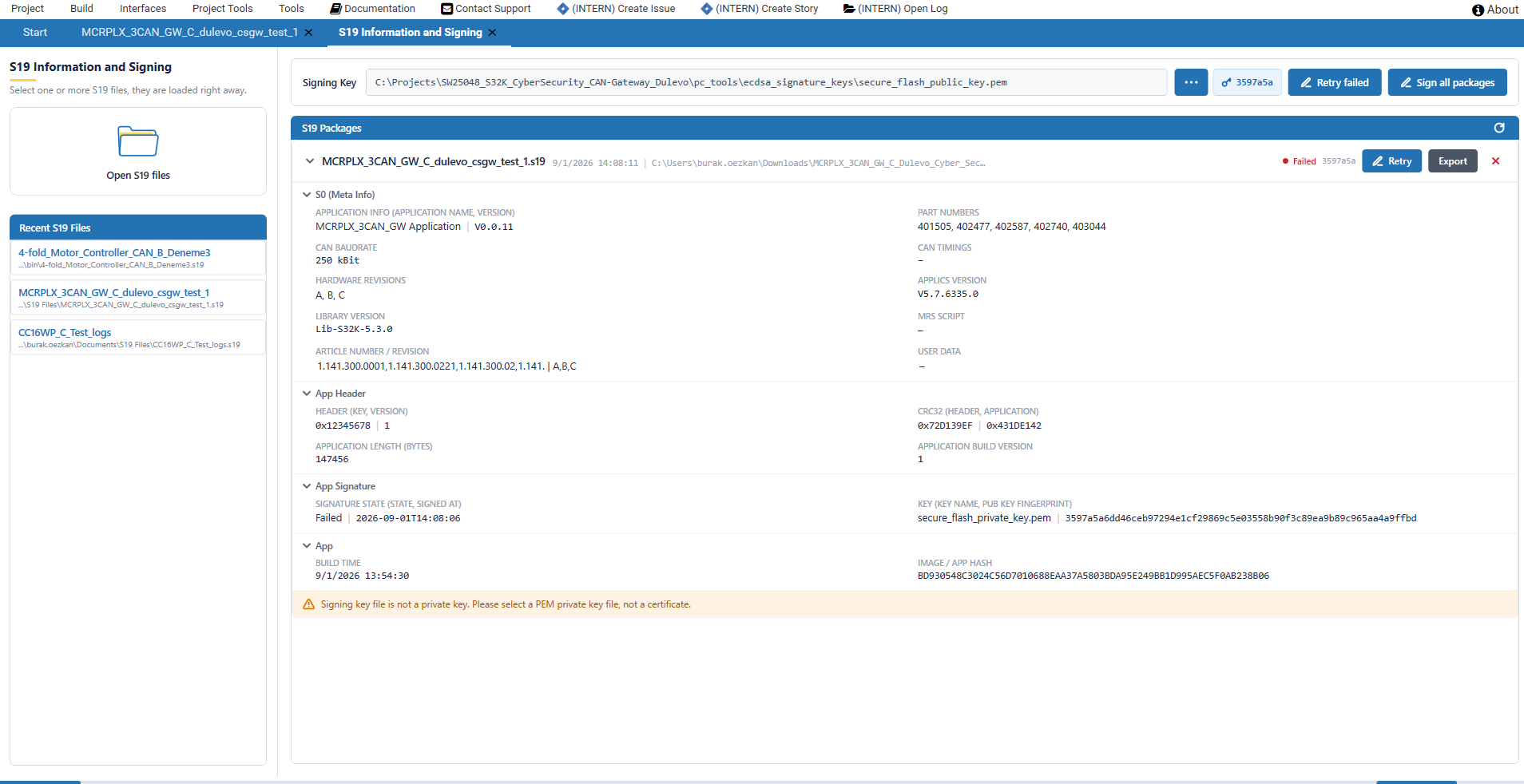
| Signing key file is not a private key. Please select a PEM private key file, not a certificate. | A public key or a certificate was selected. | Select the private key file. |
| Signing key is not an ECDSA private key. | An RSA key was selected. | Create an ECDSA P-256 key. |
| S19 file does not exist. | The .s19 was deleted or moved after it was opened. |
Press Refresh or open the file again. |
| The S19 file is not there any more and was taken out of the list | The file was removed while the page was open. | Build again or open the right file. |
| S19 signing failed: the S19 file could not be read or written. It is probably open in another program. | The .s19 is locked by another program. |
Close the other program and sign again. |
| S19 signing failed: no access to the S19 file or the signing key. | No rights on the file, or the file is read-only. | Check the rights of the file and of the key. |
| Signing script was not found in ApplicsStudio resources or Signing toolchain is incomplete | The installation is not complete, or a virus scanner removed files. | Repair the installation or install Applics Studio again. |
| S19 signing ran into a timeout | The signing did not finish, for example because it was blocked by a scanner. | Try again. If it happens again, check the virus scanner and the log. |
| S19 signing was cancelled. The file was not changed. | Cancel was pressed, or you left the page while the signing was running. |
Sign again with Retry. |
| S19 signing failed. Exit code: or Script reported errors: | The signing script itself failed. | Read the text, look into the log, check the .s19 and the key. |
| S19 signing finished, but the signature block was not changed. | The image has no valid application header at the expected address, so nothing was written. | Check that the .s19 belongs to this module type and was built with the current toolchain. |
| S19 signing finished, but signature range could not be read after signing. | The signature area could not be read back. | Build the image again and sign it again. |
| The signed S19 file could not be exported | The target folder is not writable, or the package is not signed. | Use another folder. Only signed packages can be exported. |


Signed with different key is not an error. The image is signed, only with another key than the one that is selected now. Compare the PUB KEY FINGERPRINT on the card with the key you expect.
In the picture a public key was selected instead of a private one. The card shows Failed, the reason stands below the card and Retry signs it again after the key is corrected.
Errors while Authenticating
| Message | Reason | What to do |
|---|---|---|
| Authentication key not found. Provide a valid key file or paste the key. | The field Auth Key: is empty, the path does not exist, or the pasted text is not a PEM key. |
Select the authentication private key, or paste the complete PEM text including the -----BEGIN ...----- lines. |
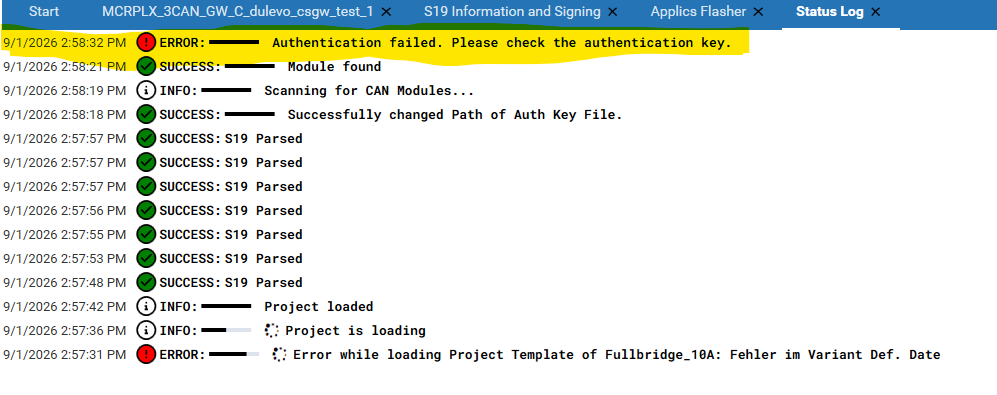
| Authentication failed. Please check the authentication key. | The module did not accept the signature, e.g. wrong key pair or the module has another public key. | Check if the key belongs to this module. Look into the flasher log for the NRC. |
| Authentication error: | An exception, for example a CAN problem or a key file that cannot be read. | Check the CAN connection and the key file. The details are in the message and in the log. |
| Please authenticate the selected module before flashing. | Start Flashing was pressed on a module that is not authenticated. |
Press Authenticate first. |
| Module does not support authentication | The module has no cybersecurity. | Nothing to do, you can use the module without authentication. |
| No answer, the authentication does not finish | The module cannot be addressed, e.g. wrong CAN channel or baudrate, no power, bus not terminated. | Scan again, check the CAN adapter, the wiring and the supply. |
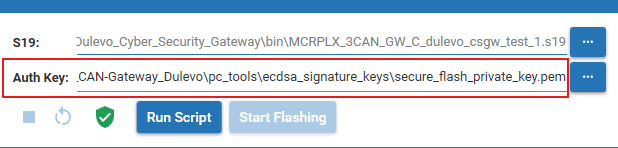
A typical cause is the wrong key in Auth Key:. In the picture the SW signature key is selected instead of the authentication key.
The module then refuses the signature and the Status Log shows the error.
Negative Response Codes
If the module does not accept a step of the authentication, the flasher log shows the code as 0xNN Name.
| Code | Name | Meaning |
|---|---|---|
0x10 |
GeneralReject | General reject |
0x11 |
ServiceNotSupported | The bootloader does not know this service |
0x12 |
SubfunctionNotSupported | Sub-function not supported |
0x13 |
IncorrectMessageLength | Wrong message length or wrong format |
0x14 |
ResponseTooLong | Response too long |
0x22 |
ConditionsNotCorrect | The conditions for this request are not correct |
0x24 |
RequestSequenceError | Wrong order of the requests |
0x31 |
RequestOutOfRange | Request out of range |
0x33 |
SecurityAccessDenied | Security access denied |
0x35 |
InvalidKey | The signature check failed, wrong authentication key |
0x36 |
ExceedNumberOfAttempts | Too many tries that did not work |
0x37 |
RequiredTimeDelayNotExpired | The waiting time after the failed tries is not over yet |
0x70 |
UploadDownloadNotAccepted | Upload or download not accepted |
0x71 |
TransferDataSuspended | Transfer data suspended |
0x72 |
WrongSequenceNumber | Wrong block sequence number |
0x78 |
RequestCorrectlyReceivedPending | Request received, the answer comes later, this is not an error |
The ones you see most are 0x35, which means the wrong authentication key, and 0x36 or 0x37, which mean that the module blocked more tries for some time. Then you have to wait and try again.
Flashing Stops at the End
The upload runs to 100 percent and then the log shows ERROR [Upload]: Download failed: ErrorWhileFlashing.
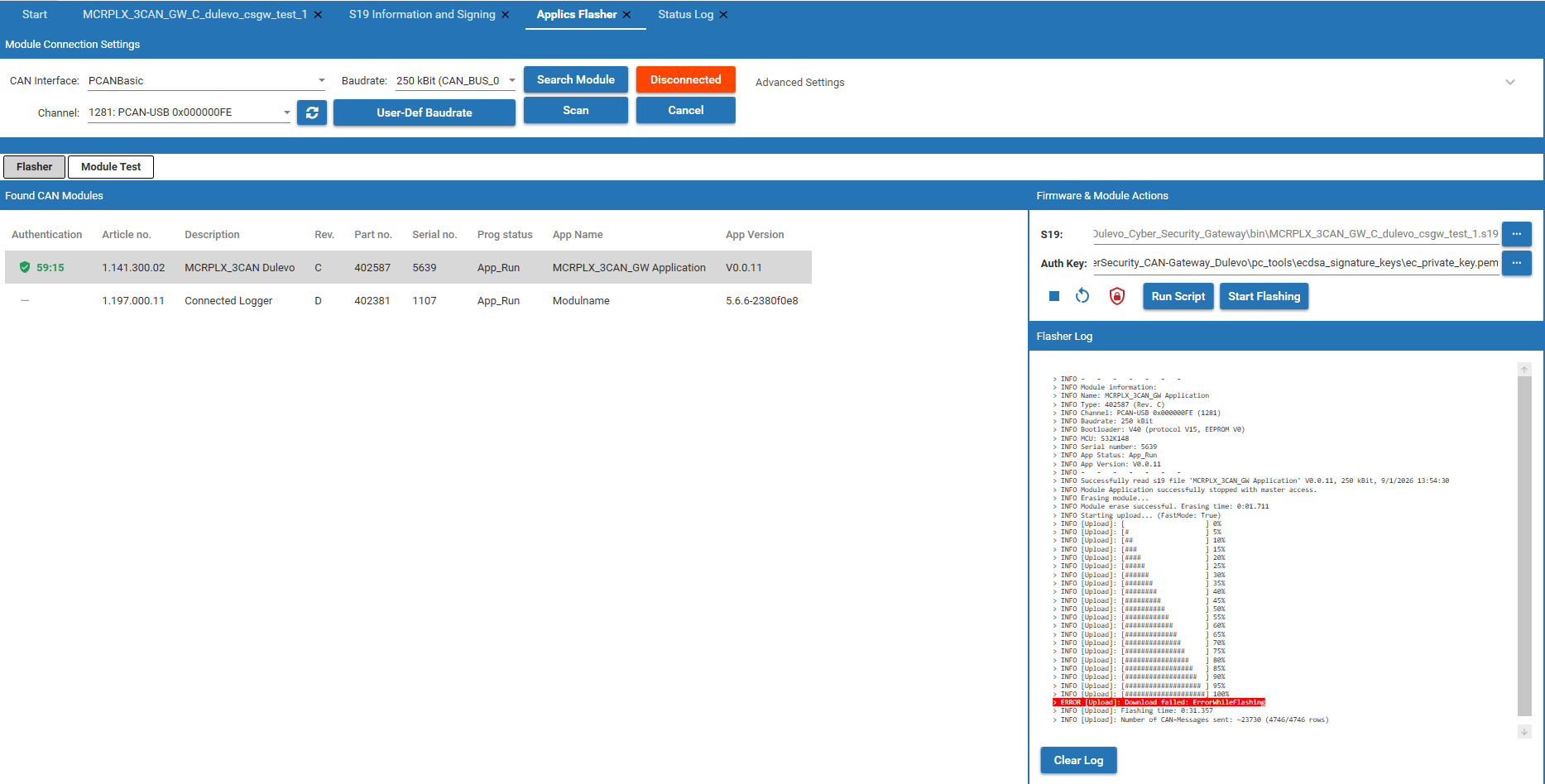
This is what you see when the image was signed with the wrong key. The transfer itself works, all data is sent, but the module does not accept the image and sends no confirmation back. The flasher waits two seconds for it and then reports the error.
Check the package on the S19 Information and Signing page, see Signing. Compare the PUB KEY FINGERPRINT of the package with the key pair that belongs to this module, sign the image again with the right key and flash it once more.
The same error can also come from a CAN connection that broke down at the end of the transfer, or from a module that was reset or lost power while flashing.
Module Secure Boot Errors
The module reports problems with the secure boot in its bootloader status. Applics Studio reads this status when you authenticate, translates it and marks the messages in the flasher log. So you see these texts after an authentication, not directly after a flashing.
| Message | Typical reason |
|---|---|
| Secure boot hash creating failed! | The bootloader could not build the hash of the image. |
| Secure boot signature validation failed! | The signature does not fit to the public key in the module. The image is not signed, or it is signed with the wrong key. |
| Secure boot mac generation failed! | The CMAC could not be created in the security hardware. |
| Secure boot mac verification failed! | The CMAC check failed. |
| Application downgrade attempted! | The version of the image is older than the one on the module. |
| Public key invalid or not set. | There is no valid SW signature public key in the module. |
| CSEC hardware initialization failed! | The security hardware of the MCU could not be initialized. |
| Application header invalid! | The application header is missing or broken, the image was not signed correctly. |
| CRC mismatch at boot time! | The CRC of the application does not fit, the image is not complete or broken. |
| Reset counter exceeded limit! | The module reset too often and stays in the bootloader. |