Table of Contents
Introduction

Important Notice: This chapter is only valid for MRS modules that have cybersecurity features enabled. If you require a sample module with these features active for testing, please contact your MRS Field Application Engineer or your assigned Sales Representative.
This chapter describes the core functionality of Applics Studio, the prerequisites you must manage outside Applics Studio, a walkthrough of a complete deployment cycle, and the meanings of the relevant error messages.
To ensure that the ECU only executes authentic, untampered Software every single time it powers on or resets, the system enforces protection using three core mechanisms:
Secure Boot
Establishes a hardware-rooted “Chain of Trust” to verify the Cipher-based Message Authentication Code (CMAC) of each component before it executes.
Secure Flash
Protects the firmware update process. Only Software packages cryptographically signed using valid ECC Private Key are accepted during flashing.
Challenge-Response Authentication
Verifies the identity of a Client before granting access. Asymmetric Challenge-Response Authentication is a security protocol where a Client (the Diagnostic Tool) proves its identity to a Server (the ECU) by using a pair of related cryptographic ECC keys: a Private Key (kept hidden on the tool) and a Public Key (stored on the ECU).
To safeguard the system against unauthorized access, the current implementation restricts critical ECU diagnostic commands behind a mandatory Challenge-Response Authentication.
The Server blocks such operations by default. They can only be executed after the Client and the Server successfully complete the asymmetric authentication handshake. If a Client attempts to send a protected command without first authenticating, the Server will reject the request and return a negative response.
Examples of Protected Commands include, but are not limited to:
Start Flashing: Initiating or executing a firmware update via the CAN bus (Secure Flash)Start Application,Stop Application,Restart Module: Executing commands to change the operational state of the moduleEEPROM Read/Write: Reading protected EEPROM areas or writing into EEPROM
While Secure Flash prevents unauthorized code from being written to the module memory during a software update, Secure Boot stops malicious code from running if an attacker manages to bypass Secure Flash protection. In short:
- Secure Flash: Controls what gets written to ECU memory
- Secure Boot: Controls what is allowed to run from ECU memory
- Challenge-Response Authentication: Ensures that only authorized Client (e.g. Applics Studio) can command the ECU to flash or modify the code


Please note that this version represents the first prototype of cybersecurity features in Applics Studio with focusing strictly on Signing and Authentication capabilities. All other related features are preliminary or not included into the release and are subject to change without notice.
ECDSA Key Pairs
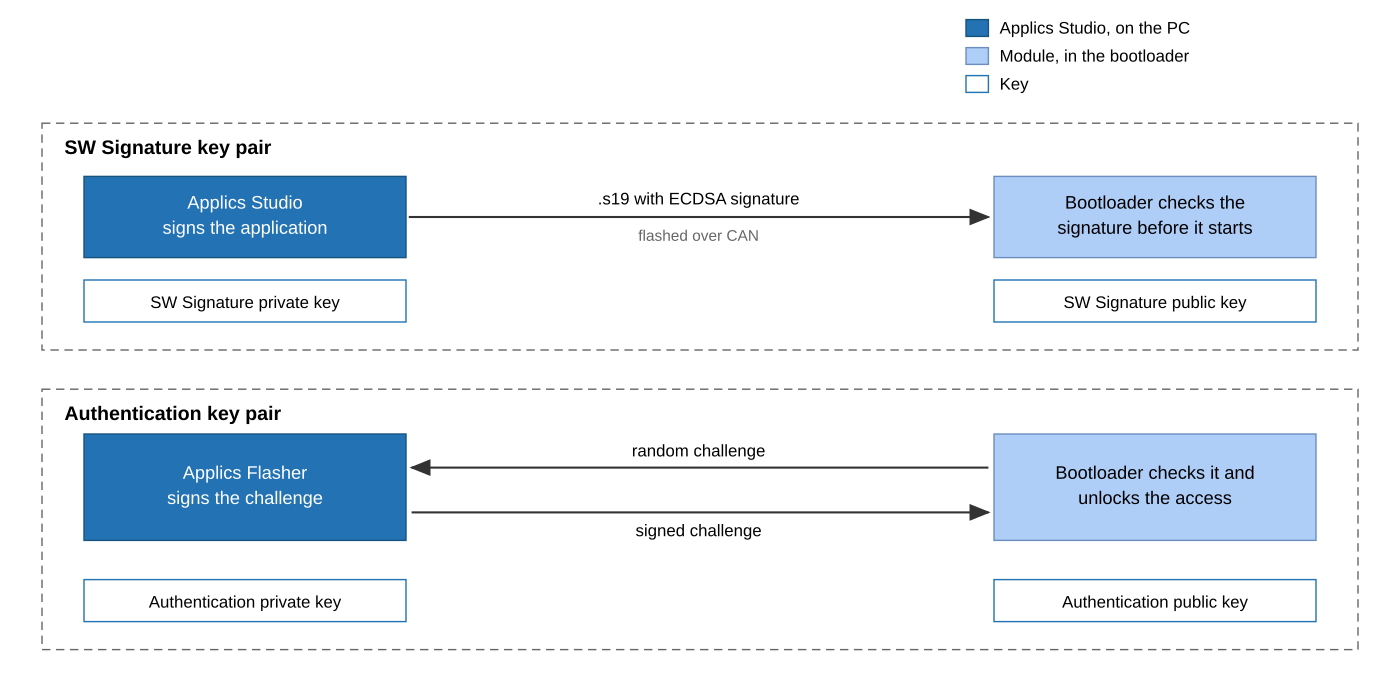
The Applics Studio cybersecurity implementation relies on two independent ECDSA Key Pairs. Because they govern different security mechanisms, they are not interchangeable. Misusing or swapping these keys will cause Authentication or Flashing operations to fail.
| Key pair | What it protects | Who uses it | Where it is used |
|---|---|---|---|
| SW Signature key pair | The integrity, authenticity and origin of the compiled application. During flashing the bootloader only accepts an application which was cryptographically signed using a valid Private Key. | Applics Studio uses the private key to cryptographically sign the S19 file. ECU uses the stored public key to validate the cryptographic signature of the S19 file during Secure Flash. |
Build and signing of the .s19 file |
| Authentication key pair | Access to the Protected Commands. Flash, start, stop and restart commands are blocked until the tool proves that it has the private key. | Applics Flasher uses the private key to cryptographically sign the challenge during the Challenge-Response Authentication procedure. ECU uses the stored public key to verify the Proof of Ownership (cryptographic signature) during the Challenge-Response Authentication procedure. |
Flasher page, before every flash session |
The private keys are used by Applics Studio. The matching public keys are written into the module during production. So, a module can only be authenticated with the authentication key pair it was set up with and it only accepts firmware that was signed with the SW signature key pair it was set up with.
What Applics does
- Stores the
Signing Keyand theAuthentication Keyin the project. - Signs automatically during the build. If a
Signing Keyis set, everyBuildandRe-Buildsigns the.s19and writes the signing information into the file. - Can sign existing
.s19files manually on theS19 Information and Signingpage, also several files at once. - Reads the signature state of a
.s19and shows it:Signed,UnsignedorSigned with different key, together with key name, public key fingerprint and signing time. - Exports a signed package together with a
.jsonfile that contains the same information. - Authenticates modules in the Flasher and blocks the module actions as long as a cybersecurity module is not authenticated.
- Translates the cybersecurity errors of the module into readable text in the flasher log.
What Applics does not Support
| Topic | Where it is done | More |
|---|---|---|
| Creating the ECDSA key pairs | On the PC with OpenSSL, before you use Applics Studio | - |
| Encrypting the authentication private key for the transfer | OpenSSL | - |
| Exchanging the keys with MRS | Own procedure, ask MRS about it | - |
| Writing the public keys into the module | MRS production | - |
| Secure boot itself (hash, signature check, CMAC, downgrade protection) | Module bootloader | Troubleshooting |
| Keys on an HSM or a smartcard | Not part of the first prototype | - |

Applics Studio does not create keys and does not exchange them. It only uses the private key files that you select. If the private keys are lost, the modules cannot be updated any more.
Before Getting Started
- Applics Studio is installed and the project of the cybersecurity module is open
- You have received the
Transport keysfrom Applics - MRS has written the matching public keys into the module
- A supported CAN adapter is connected and the driver is installed, see Flasher
- The module is connected to the CAN bus and has power
General Workflow
- Get the
Transport keysfrom Applics - Set the
Signing Keyand the authentication key in the project, see Signing - Build the project. The
.s19is signed automatically - Authenticate the module in the Flasher, see Authentication
- Flash the signed image
Glossary
| Term | Meaning |
|---|---|
| ECDSA | Elliptic Curve Digital Signature Algorithm. Here with the NIST P-256 curve (prime256v1) |
| PEM | Text format for keys, with -----BEGIN ...----- and -----END ...----- around the data |
| Private key | The secret part of a key pair. It creates the signatures and stays in the secure environment |
| Public key | The part you can share. It checks the signatures and is stored in the module |
| Fingerprint | SHA-256 hash of the public key in DER format. It identifies a key pair without showing it |
| S0 record | Header record of a Motorola S-record file (.s19). It holds information and is not flashed |
| App header | Structure in the firmware with version, length, CRC32 and the signature |
| Secure boot | The check of the firmware signature by the bootloader before the application starts |
| NRC | Negative Response Code, the error code the module sends back for a request it does not accept |
| Challenge-response | The module sends a random value and the tool has to sign it |